
User Guide – AppTajo
Welcome to AppTajo, your daily companion for optimizing routes and avoiding traffic jams. Below, we explain how to use the main features of the application.
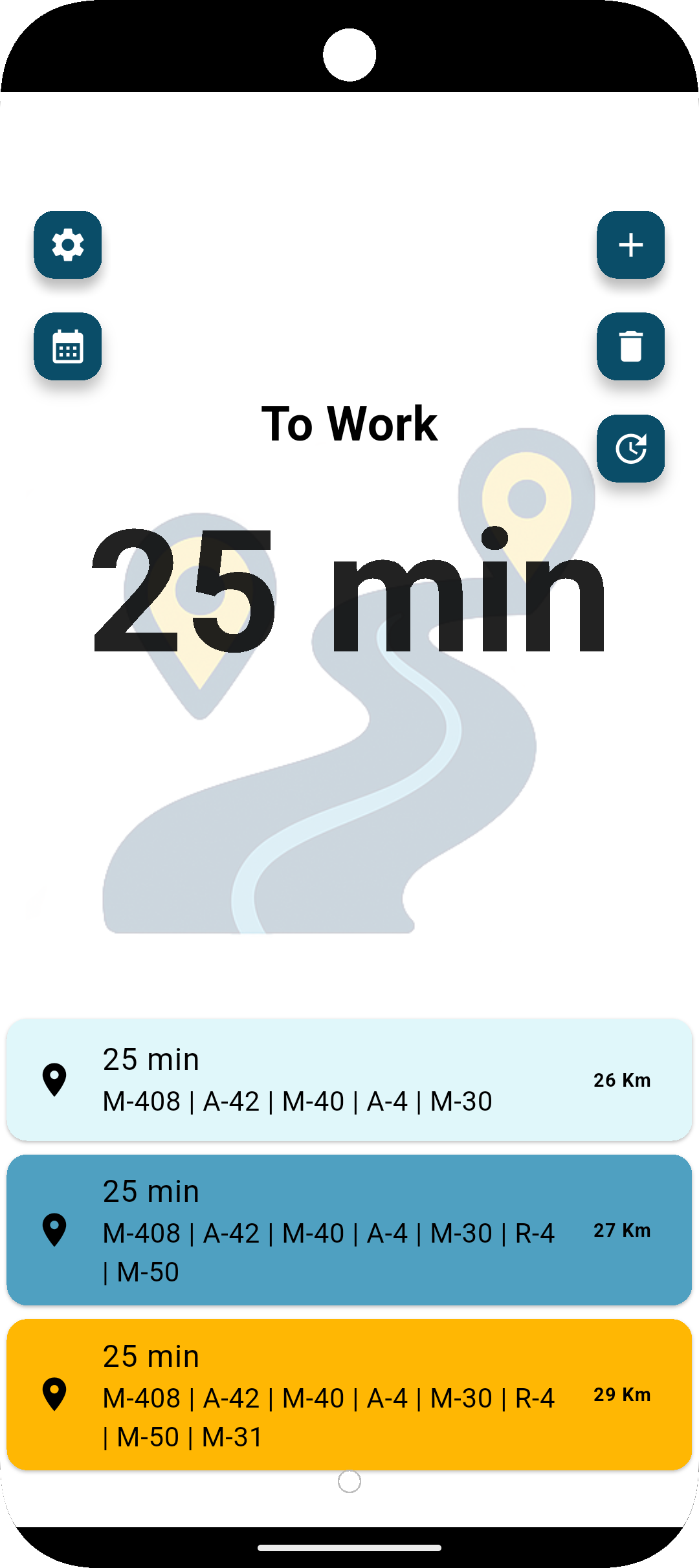
1. Route Management (Top Buttons)
- [ + ] (Add Route): Tap this button to configure a new frequent journey (e.g., home-to-work).
- [ 🗑️ ] (Delete): Deletes the currently selected route.
- [ ⚙️ ] (Settings): Configure your driving preferences and manage notification permissions.
- [ 🗓️ ] (Calendar): Planed routes for times.
2. Monitoring and Analysis
In the center of the screen, you will see the name of your active route and the estimated time based on current traffic conditions
3. Calculate Alternative Routes
Tap the [ 🔄 ] (Refresh) button to have the application analyze real-time traffic and recalculate the best option.
4. Results and Journey Options
At the bottom, you will see the alternatives ordered by efficiency:
- Fastest Route: Highlighted, showing the estimated time, distance, and main roads to take.
- Alternative Routes: Displayed below with different times and distances so you can choose based on your preferences.